Understanding 3D Data Security and Its Visual Representation in Design
In today’s digital world, data security is a top priority for individuals, businesses, and governments alike. As cyber threats become more sophisticated, the need for robust protection mechanisms has never been greater. One way to communicate these complex ideas effectively is through visual design—particularly 3D data security illustrations. These designs are not only visually appealing but also help convey important concepts related to information safety in an intuitive manner. In this article, we’ll explore what 3D data security means, why it matters, and how you can use it across various platforms like websites, banners, posters, and UI/UX projects.
What Is 3D Data Security?
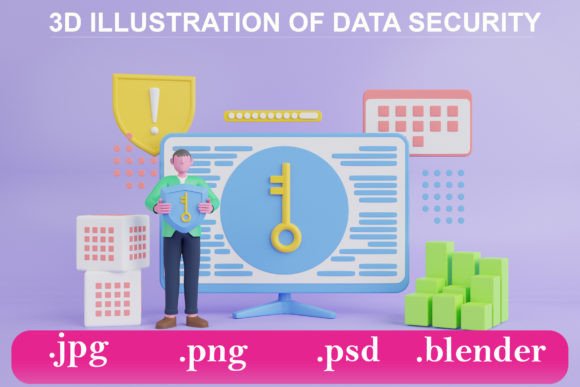
3D data security refers to the use of three-dimensional visual elements to represent and explain data protection strategies, systems, and vulnerabilities. Unlike traditional 2D graphics, 3D illustrations add depth, perspective, and realism, making them ideal for showcasing abstract or technical concepts in a more digestible format.
These visuals often include elements such as:
- Locks and shields representing encryption and access control
- Data servers and firewalls illustrating network security layers
- Network nodes and connections showing how data flows securely between devices
- Abstract barriers or walls symbolizing data privacy and protection
When created using tools like Blender, Adobe Photoshop (PSD), or graphic software that exports to formats like JPG, PNG, or SVG, these 3D illustrations can be adapted for multiple uses. Whether you’re designing a website header, a promotional poster, or an infographic, having a high-quality 3D illustration of data security can make your message stand out.
The Purpose of 3D Illustrations in Data Security
The primary purpose of using 3D illustrations in data security is to simplify complex topics. For example, explaining how encryption works or how a firewall protects a system can be challenging with words alone. However, a well-crafted 3D image can show the process in action, helping viewers grasp the concept without needing technical expertise.
Additionally, 3D illustrations serve several key functions:
- Education: They are used in training materials to teach users about safe online behavior and security protocols.
- Marketing: Businesses leverage these visuals to promote cybersecurity products and services in a more engaging way.
- UI/UX Design: Developers and designers use them to create intuitive interfaces that guide users toward secure actions, such as logging in or sharing personal information.
- Brand Awareness: Companies can build trust by incorporating professional-looking security imagery into their branding, signaling that they take user safety seriously.
Why 3D Over 2D?
While 2D graphics are still widely used, 3D offers a unique advantage: realism and immersion. A 3D illustration of a locked data vault or a protected network can feel more tangible and relatable than a flat image. This helps audiences connect with the content on a deeper level, especially when the topic involves something as critical as data security.
Moreover, 3D visuals are versatile. Once designed, they can be rendered from different angles, animated, or integrated into interactive web experiences. This adaptability makes them particularly valuable in modern digital marketing and educational contexts.
How to Use 3D Data Security Files
If you’ve acquired a 3D data security file—whether in JPG, PNG, PSD, or Blender (.blend) format—you have many options for repurposing it. Here are some common applications:
Creating Banners and Posters
A 3D illustration of data security can serve as the focal point of a banner or poster. For instance, a tech company launching a new cybersecurity product might use a shield-shaped logo with floating encrypted data packets around it. This creates a strong visual metaphor for protection and innovation.
Using a PSD file allows for easy editing in Adobe Photoshop, where you can layer text, logos, or call-to-action buttons over the illustration. Similarly, if you're working with a JPG or PNG, you can incorporate it into print or digital campaigns without worrying about transparency or vector paths.
Website Headers and Landing Pages
Websites that focus on IT services, cloud computing, or digital security often feature 3D illustrations in their headers. These images immediately set the tone for the page and reinforce the site's commitment to protecting user data.
For developers, using a Blender file gives the ability to render the image dynamically or even animate it for a more engaging experience. An animated shield rotating with glowing locks or a pulsing firewall can catch attention and enhance the overall user experience.
UI/UX Elements
In app or website design, 3D illustrations can be used to represent features like account settings, login pages, or privacy controls. These visuals can help users understand the importance of certain actions, like enabling two-factor authentication or updating passwords regularly.
Designers can extract individual components from a 3D model—such as a lock icon or a server tower—and scale them down for use in icons, buttons, or tooltips. These assets can be exported in multiple formats, including PNG with transparent backgrounds, making them suitable for integration into any interface.
Promotional Materials and Social Media
With the rise of video content and motion graphics, static 3D illustrations are just the beginning. You can convert your Blender files into short animations or GIFs for social media posts, YouTube thumbnails, or explainer videos. These visuals can be used to highlight key points like “Protect Your Data” or “Secure Cloud Storage,” increasing engagement and driving home your message.
Common Misconceptions About 3D Data Security Graphics
Despite their usefulness, there are some misunderstandings about 3D data security illustrations:
- Misconception 1: “3D illustrations are only for large corporations.”
Reality: Small businesses and startups can benefit greatly from these visuals to communicate security in a trustworthy and professional manner. - Misconception 2: “You need advanced skills to use 3D files.”
Reality: Many 3D illustration files come ready-made and can be used as-is in presentations or marketing materials. Basic knowledge of graphic software is often sufficient to implement them effectively. - Misconception 3: “3D graphics are too flashy for serious topics.”
Reality: When done right, 3D graphics can maintain a professional tone while making information more accessible and memorable.
Practical Relevance in Everyday Life
Data security isn’t just a concern for IT professionals—it affects everyone who uses the internet. From online banking to social media accounts, our personal and financial data is constantly at risk. 3D illustrations help raise awareness about these risks in a way that’s easy to understand and visually compelling.
For example:
- Public service announcements may use 3D graphics to demonstrate how phishing attacks work and how to avoid them.
- Teachers can use these visuals in classroom presentations to educate students about online safety and responsible data handling.
- Employees can learn about company policies through 3D-based training modules that simulate secure and insecure scenarios.
Real-World Applications
Many industries rely on 3D data security graphics to support their messaging:
- Finance: Banks and fintech companies use 3D visuals to reassure customers that their transactions are secure.
- Healthcare: Medical institutions utilize these illustrations to emphasize patient data confidentiality and compliance with regulations like HIPAA.
- Education: Online learning platforms incorporate 3D graphics to illustrate how student data is protected during virtual classes and assessments.
- Government: Agencies use 3D visuals in public campaigns to promote cybersecurity awareness and national defense against digital threats.
Choosing the Right File Format for Your Needs
Depending on your project, the choice of file format can impact how you use a 3D illustration:
JPG – Best for Simplicity and Speed
JPG files are compressed and ideal for quick loading times. They’re perfect for background images on websites or print materials where high resolution is needed but transparency isn't necessary.
PNG – Perfect for Transparency and Clarity
PNG files support transparency and higher color quality, making them great for overlaying graphics on different backgrounds. If you want to place a 3D shield icon over a colorful UI element, PNG is the go-to format.
PSD – Ideal for Customization and Layer Control
Adobe Photoshop's native PSD format is excellent for designers who want full control over the illustration. It allows for layer adjustments, effects, and resizing without compromising quality. This flexibility is essential for creating custom designs tailored to specific brands or messages.
BLENDER – For Advanced Users and Animators
Blender files offer complete access to the 3D model, textures, and animations. While they require some familiarity with 3D modeling software, they give you the freedom to modify the illustration extensively or turn it into an animation. This makes Blender files especially powerful for developers and multimedia creators.
Conclusion
3D data security illustrations are more than just eye-catching—they are effective tools for communication and education. By combining visual storytelling with accurate representations of security concepts, these graphics help bridge the gap between technical jargon and everyday understanding.
Whether you're a designer looking to create a compelling website, a marketer crafting a campaign, or an educator preparing a lesson, 3D data security visuals can elevate your content and engage your audience. With formats like JPG, PNG, PSD, and Blender available, you have the flexibility to integrate these designs into almost any medium, ensuring your message of protection and privacy is clearly conveyed.
As technology continues to evolve, so does the need for innovative ways to present data security. Embrace 3D illustrations to stay ahead in both design and communication, and help your audience see the value of safeguarding their digital lives.