3D Building Pack for Creative Projects
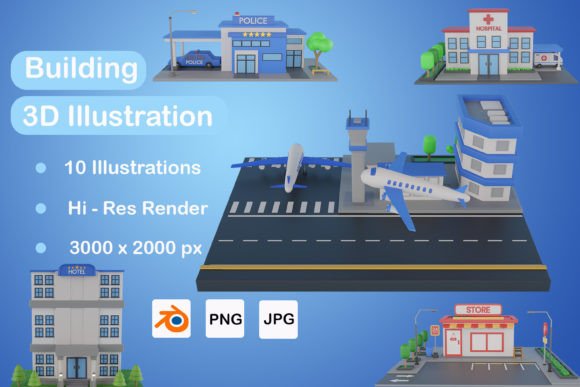
If you're in the creative world, you know that design assets can make or break a project. The 3D Building Pack is a versatile and visually striking resource that includes 10 JPG files, 10 PNG files, and 10 Blender files—offering everything you need to bring architectural elements into your designs with depth, realism, and flexibility. Whether you're crafting a website layout, designing promotional materials, or working on UI/UX projects, this pack delivers the tools to elevate your work from flat to dynamic.
Visual Characteristics and Design Appeal
The 3D Building Pack features stylized building models rendered in high detail, each designed to fit seamlessly into digital and print environments. These assets are not just generic structures; they have a distinct visual personality that blends modernity with subtle textures and lighting effects. The buildings vary in architectural styles—some are sleek and contemporary, while others lean towards vintage or industrial aesthetics. This diversity makes the pack suitable for a wide range of themes and industries.
Each asset comes in both transparent (PNG) and non-transparent (JPG) formats, ensuring compatibility across different platforms and backgrounds. The Blender files add another layer of utility, allowing designers to modify the buildings' scale, color, and orientation to suit specific needs. With these files, you're not just using a static image—you’re unlocking a world of creative possibilities through 3D modeling software.
Design Flexibility and Realism
One of the standout qualities of the 3D Building Pack is its ability to mimic real-world architecture without overcomplicating the design process. The models include shadows, highlights, and depth cues that give them a natural look when layered onto other visuals. This attention to detail helps maintain a professional tone in your work while adding an element of sophistication often reserved for 3D rendering specialists.
Because the assets are pre-rendered and available in multiple file types, they are ideal for both quick mockups and long-term brand development. The clean lines and structured forms appeal to audiences looking for clarity and modernity, making it especially useful for urban-themed content or tech-forward branding initiatives.
Where to Use the 3D Building Pack
The applications for the 3D Building Pack are vast. Here’s a breakdown of some of the most impactful use cases:
- Web Design: Add dimension to landing pages, infographics, or background elements for a more immersive user experience.
- Social Media Graphics: Create eye-catching banners and headers that stand out in crowded feeds.
- UI/UX Mockups: Use the buildings as contextual placeholders in app or website prototypes to represent locations or settings.
- Editorial Design: Incorporate the 3D assets into magazine layouts, blog posts, or reports for a fresh visual twist.
- Packaging Design: Showcase products in a cityscape environment to build relatability and context.
- Logo Design: Blend the buildings subtly into logos for brands with a strong architectural or urban identity.
Marketers and entrepreneurs will find these assets particularly valuable when promoting real estate, construction services, or location-based businesses. A well-placed 3D building can evoke a sense of place, helping viewers connect with the message on a more intuitive level.
Perfect for Branding and Promotions
For small business owners and startups, the 3D Building Pack offers a premium touch without the need for complex production. It's easy to integrate into marketing collateral such as posters, flyers, and presentations. You could, for instance, feature a stylized building in the corner of a property listing poster to anchor the concept instantly. Or, use the PNGs in transparent backgrounds to overlay on photos for real estate websites or social media ads.
Bloggers and publishers might consider using the assets in article thumbnails or chapter dividers to enhance visual storytelling. The consistent style across all 10 models ensures a cohesive look even when mixing and matching elements, which is great for maintaining a unified brand identity.
Impact on Readability and Audience Engagement
While the primary function of the 3D Building Pack is to provide visual interest, it also plays a supporting role in readability and engagement. In editorial or web design, placing a 3D building near key text sections can help guide the viewer’s eye and establish visual hierarchy. The pack's assets aren’t distracting—they complement the content by offering a clear focal point without overwhelming the page.
When used in logo design or branding materials, the 3D elements contribute to brand recognition. A stylized building icon associated with a company becomes a memorable visual cue, reinforcing the brand's identity every time it appears. For instance, a real estate firm could incorporate a minimalist 3D structure into their header or watermark to create a signature look that ties all their materials together.
Professionalism and Consistency
Consistency is key in professional design, and the 3D Building Pack supports that principle. By using the same set of models across various assets—like brochures, websites, and social media posts—you can ensure a uniform aesthetic that strengthens your brand message. The included Blender files let you tweak colors and angles so they align perfectly with your existing visual guidelines.
Moreover, the pack's realistic yet stylized approach adds a level of professionalism to any project. Unlike low-quality stock images or basic vector graphics, these 3D models feel intentional and crafted. That’s why many creatives prefer using them in presentations, product showcases, or portfolio pieces where quality is paramount.
Choosing and Using the 3D Building Pack Effectively
Selecting the right assets from the 3D Building Pack starts with understanding your project’s purpose and audience. Are you aiming for a futuristic vibe? Maybe a glassy, angular building would be best. Looking to evoke nostalgia or tradition? Opt for a model with brick-like textures or classic windows.
Before finalizing your choice, test how the buildings interact with your existing design elements. Try placing them beside your chosen typeface—whether it’s a sans serif font for minimalism or a script font for elegance—and see if they enhance the overall composition. The goal is balance: the 3D assets should support the message, not compete with it.
Evaluating Project Fit and Font Pairing
Font pairing is crucial when using 3D elements alongside text. Since the 3D Building Pack brings a strong visual presence, it pairs best with fonts that are clean and readable. Think of a modern typography approach—perhaps a bold display font for headlines and a lighter serif font for body text. This contrast keeps the design engaging while preserving legibility.
Here’s a practical example: If you're designing a website for a boutique hotel in a historic district, you might pair one of the older-style buildings from the pack with a soft, elegant handwritten font to emphasize warmth and character. Conversely, for a tech startup based in a metropolitan area, a sharp, glassy building with a sans serif font would reinforce innovation and efficiency.
Commercial Licensing and Practical Tips
Before diving into commercial projects, always verify the licensing terms of the 3D Building Pack. Many premium fonts and design assets require proper attribution or come with usage restrictions. Fortunately, this pack is typically offered under a flexible license that allows use in both personal and commercial contexts—ideal for marketers, bloggers, and small business owners who want to maintain a professional edge without legal hurdles.
To get the most out of the pack, consider organizing the files into categories based on style or complexity. This helps streamline your workflow, especially when creating multiple versions of a design. Also, don’t hesitate to combine the 3D models with other design assets like icons, textures, or gradients for a richer visual outcome.
Real-World Applications and Creative Possibilities
Let’s explore a few real-world examples of how the 3D Building Pack can be applied creatively:
- City Guide Websites: Use the buildings as section dividers or featured illustrations to represent different districts or landmarks.
- Architectural Portfolios: Highlight design concepts by placing 3D buildings behind sketches or renderings for added context.
- Infographics: Showcasing data about urban growth or infrastructure becomes more compelling with 3D visuals that mirror real-world scenarios.
- Print Materials: From business cards to billboards, the pack's scalable nature ensures crisp output at any size.
These examples illustrate how the pack isn't just for surface-level decoration—it's a strategic tool that enhances communication and storytelling. When used thoughtfully, the 3D Building Pack can turn ordinary designs into powerful visual narratives.
Maximizing Your Design Assets
To maximize the value of the 3D Building Pack, think beyond static use. Experiment with animations in video projects or slide transitions in PowerPoint presentations. Because the Blender files allow for full customization, you can rotate, resize, or recolor the buildings to match your evolving design needs.
Another tip: Don’t limit yourself to large-scale visuals. Smaller, repeated elements like mini-building icons can be used in navigation bars, side menus, or mobile app interfaces to maintain a consistent theme without overpowering the layout.
Conclusion
Incorporating the 3D Building Pack into your design toolkit opens up new avenues for creativity and expression. Its blend of realism and simplicity, combined with the adaptability of Blender files, makes it a go-to resource for professionals and hobbyists alike. Whether you're refining your brand identity or enhancing a promotional campaign, this pack provides the foundation to craft compelling, dimensional visuals that resonate with your audience.
By choosing the right assets and pairing them effectively with your typography and layout, you can transform your projects from average to extraordinary. So next time you're brainstorming a new design direction, remember that the 3D Building Pack is more than just a collection of images—it's a catalyst for innovative thinking and impactful results.