Freckles Procreate Brush Set: A Creator’s Tool for Realistic Skin Textures
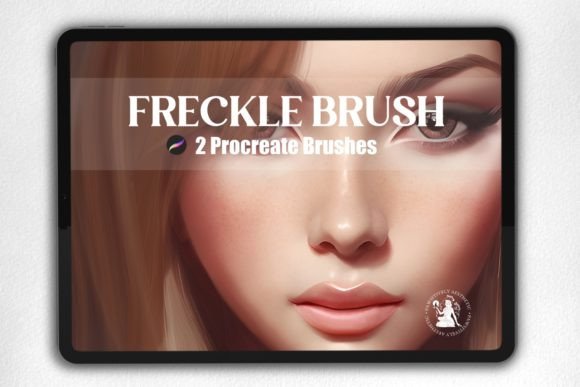
Character design is an intricate process that requires attention to detail, especially when it comes to skin textures. One of the most effective ways to bring depth and realism to digital illustrations is by using specialized brushes tailored for skin work. The Freckles Procreate Brush Set offers a unique solution for artists working within the Procreate app on their iPad. With 22 custom brushes designed specifically for creating and enhancing skin tones, this set is ideal for both 2D and 3D artists looking to elevate their character designs.
What Is the Freckles Procreate Brush Set?
The Freckles Procreate Brush Set is a digital brush pack that provides creators with tools to easily add freckles, blemishes, texture variations, and subtle shading to their artwork. These brushes are crafted with precision to mimic natural skin patterns, making them particularly useful in portrait illustration, fantasy art, and even in stylized cartoon characters where realism or organic touch is desired.
This brush set is not just about adding freckles; it includes a range of features that support skin rendering such as fine detailing, soft highlights, and shadow blending. Whether you're working on a fantasy elf with sun-kissed freckles or a realistic human face with natural imperfections, these brushes offer a quick and efficient method to achieve professional results.
Key Features of the Freckles Procreate Brush Set
- 22 Custom Skin Brushes: Each brush has been carefully designed to provide different skin effects, from subtle grain to dramatic shading.
- Perfect for Shading and Highlighting: The brushes allow for smooth transitions between light and dark areas, giving your artwork a more dynamic look.
- Compatibility with Procreate App: This brush set works exclusively with the Procreate app on iPad, ensuring seamless integration into your creative workflow.
- Easy Installation: Once downloaded, the .brushset file can be installed directly through the Files app on your iPad, simplifying the setup process.
How to Install the Freckles Procreate Brush Set
- After purchasing and downloading the set, open the Files app on your iPad.
- Navigate to the Downloads section to locate the .brushset file.
- Select the file by tapping it once. It will automatically install into the Procreate app.
- Once installed, you can find the new brushes under the brush menu in Procreate.
This straightforward installation makes it easy for users of all skill levels to begin using the brushes immediately without complicated steps or additional software.
Who Can Benefit from Using the Freckles Procreate Brush Set?
Artists across various disciplines can benefit from this tool. Here's a closer look at who might find it particularly useful:
- Illustrators and Character Designers: Ideal for adding personality and uniqueness to characters through skin details.
- Comic and Book Artists: Great for enriching facial expressions and backgrounds with subtle skin textures.
- Concept Artists: Useful in designing characters for games, films, or animations where skin realism plays a key role.
- Portrait Artists: Helps create lifelike portraits with nuanced skin tones and natural freckle placement.
Whether you're a hobbyist or a professional artist, the Freckles Procreate Brush Set adds value by streamlining the process of achieving complex skin effects without compromising quality.
Real-World Applications and Use Cases
Let’s explore some practical examples of how the Freckles Procreate Brush Set can be used:
Creating Fantasy Characters
In fantasy art, characters often have distinct physical traits like freckles or other natural markings. Instead of manually drawing each freckle, the brush set allows you to apply them quickly and consistently. For instance, if you’re illustrating a woodland fairy or a sun-exposed warrior, these brushes help you add authenticity and charm with minimal effort.
Enhancing Digital Portraits
For portrait artists, skin texture is crucial. The Freckles Procreate Brush Set enables you to layer subtle freckles or age spots over base skin tones, resulting in a more dimensional and believable subject. You can also use the brushes for highlighting cheekbones or adding shadows beneath the nose—details that bring life to any portrait.
Designing Stylized Cartoons
Even in stylized cartoon art, skin texture can enhance expressiveness. Think of a cute, freckled child character in a children’s book or a whimsical animal with a textured coat. These brushes allow for controlled yet expressive detailing that complements the overall style while maintaining visual interest.
Evaluating the Suitability of the Freckles Procreate Brush Set
Before deciding to incorporate the Freckles Procreate Brush Set into your toolkit, consider the following factors:
- Device Compatibility: Ensure you have an iPad with the Procreate app installed. These brushes won’t work on other devices or platforms.
- Art Style Match: If your work relies heavily on abstract or highly stylized forms, assess whether skin-based brushes will contribute to your vision.
- Learning Curve: While the brushes are user-friendly, experimenting with pressure sensitivity and opacity settings may require some adjustment to get the best results.
- Project Requirements: Determine if your project needs high-resolution skin details or if a simpler approach would suffice.
By considering these aspects, you can decide whether the Freckles Procreate Brush Set aligns with your artistic goals and workflow.
Strengths
- Offers a variety of brushes suitable for multiple purposes beyond freckles, including blemishes and skin shading.
- Designed for efficiency—save time while still producing detailed and realistic results.
- Compatible with one of the most popular digital illustration apps, Procreate, which is widely used by professionals and amateurs alike.
Limitations
- Exclusive to Procreate and iPad—artists using other apps or tablets may need alternative tools.
- Best suited for skin-related tasks; it may not replace general-purpose brushes for other parts of an illustration.
- Digital-only product means there's no tactile component, which isn't relevant here but worth noting for those expecting physical goods.
Despite these limitations, the Freckles Procreate Brush Set remains a valuable addition for those focused on skin texture in their digital art.
Why Choose the Freckles Procreate Brush Set?
Many artists struggle with creating skin that looks natural or feels part of the character rather than an afterthought. The Freckles Procreate Brush Set addresses this challenge by providing a curated selection of brushes that simplify the process while encouraging creativity. Its versatility ensures that you can adapt the brushes to fit your specific needs, whether you're aiming for photorealism or a more cartoonish style.
Moreover, since the brushes are pre-built and optimized for Procreate, they eliminate the need to search for or develop your own skin textures. This convenience allows you to focus more on your artistic expression and less on technical adjustments.
Practical Tips for Getting the Most Out of the Set
To maximize the potential of the Freckles Procreate Brush Set, try these tips:
- Experiment with Opacity: Lowering the opacity can help blend freckles seamlessly into skin tones.
- Layer Wisely: Use separate layers for freckles and shading to maintain flexibility during edits.
- Adjust Pressure Sensitivity: Customize how the brushes respond to your touch to match your preferred style.
- Combine with Other Tools: Pair these brushes with Procreate’s built-in tools for blending, erasing, and masking to refine your results.
These practices will help you integrate the brushes smoothly into your workflow and produce polished, professional-quality illustrations.
Final Thoughts and Recommendations
The Freckles Procreate Brush Set is a powerful resource for artists seeking to enhance their character designs with realistic skin textures. Its ease of use, combined with the ability to deliver detailed results, makes it a great choice for anyone working with digital skin rendering. However, it’s important to evaluate your individual needs before purchase to ensure it complements your creative goals.
If you're unsure whether this brush set fits your current projects, start with a small test piece. Try applying the brushes to a simple sketch and see how they perform. This hands-on approach will give you a better sense of their usefulness and allow you to make an informed decision.
For those who frequently work with character design or portraiture, investing in the Freckles Procreate Brush Set could significantly improve the efficiency and quality of your output. As always, practice and experimentation are key to mastering any new digital tool.
Explore More Tools in Hi Welcome to My Shop
If you found the Freckles Procreate Brush Set helpful, you might want to check out other brush sets and digital tools available in Hi Welcome to my shop. Their collection is regularly updated with new brushes and resources to support artists at every stage of their journey. Following the shop can keep you informed about upcoming releases and special offers.